Don’t miss out on this week’s #POWERCast with Greg Schmidt of @fortraofficial! Join us on December 7th to learn more about the limitations of Query/400 and how modernized BI remedies them. Register NOW!

Don’t miss out on this week’s #POWERCast with Greg Schmidt of @fortraofficial! Join us on December 7th to learn more about the limitations of Query/400 and how modernized BI remedies them. Register NOW! bit.ly/3h5QrRM pic.twitter.com/CT8PKxUmUK

– COMMON (@COMMONug)07:00 – Dec 06, 2022

A screen a story – What does this SQL button do?

When working in the IT business we all appreciate it if we are being helped by the operating system. For that purpose in the New Navigator for I IBM created the SQL button. Should we all start to use the name Navigator for i or keep it short, like I do, and use the term “Nav4i”?
What you call it doesn’t really matter, what matters is knowing how to use it.

Below you see an image of the button I would like to talk about:

This SQL button will tell you which SQL statement was used to get the data presented from IBM i. Please be aware that in rare cases this button is greyed out, not everything presented is retrieved using SQL. For example, when looking at the TCP/IP server on your LPAR, that is one of them.

When pressing the SQL button of the screen show above, an extra screen will pop up and show you the actual SQL statement used:

When pressing the button “Run SQL” you might get a window telling you what you need to do.

When starting IBM i Access Client Solutions (ACS) under the Tools menu you will find the option “Navigator Requests”:

When selecting that option, you will have the option to “Start Listening” by pressing the “Start” button:

Resulting in:

So when going back to Nav4i, pressing the “Run SQL” button again will result in an ACS Run SQL script being opened with an active connection to that system:

The idea to write this article came from this button and was based on call I received from a customer. The request they had was to automate the process of changing the object owner for all *DEVD objects created by a system administrator who had left the company. As the user owned over 100 printers and these printers were always in use, it included some extra work they did not look forward to. Especially as it this had to be done manually.

Doing this automatically had some challenges. Stopping the printer, vary the printer off, changing the owner, vary the printer back on again and finally starting the printer afterwards. Of course only for any printers which were running.

In order to get the information I went to Navi4 and selected “Users and Groups” and “Users”. Selected a random user and took the option to view the Library Objects only:

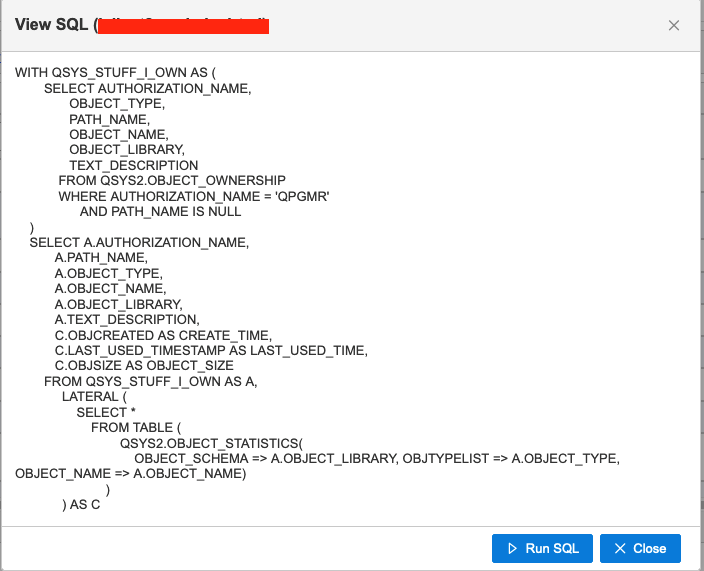
When doing that I did not care about the data, all I need is the SQL statement behind it:

After making some changes, I ended up with the statement shown below:

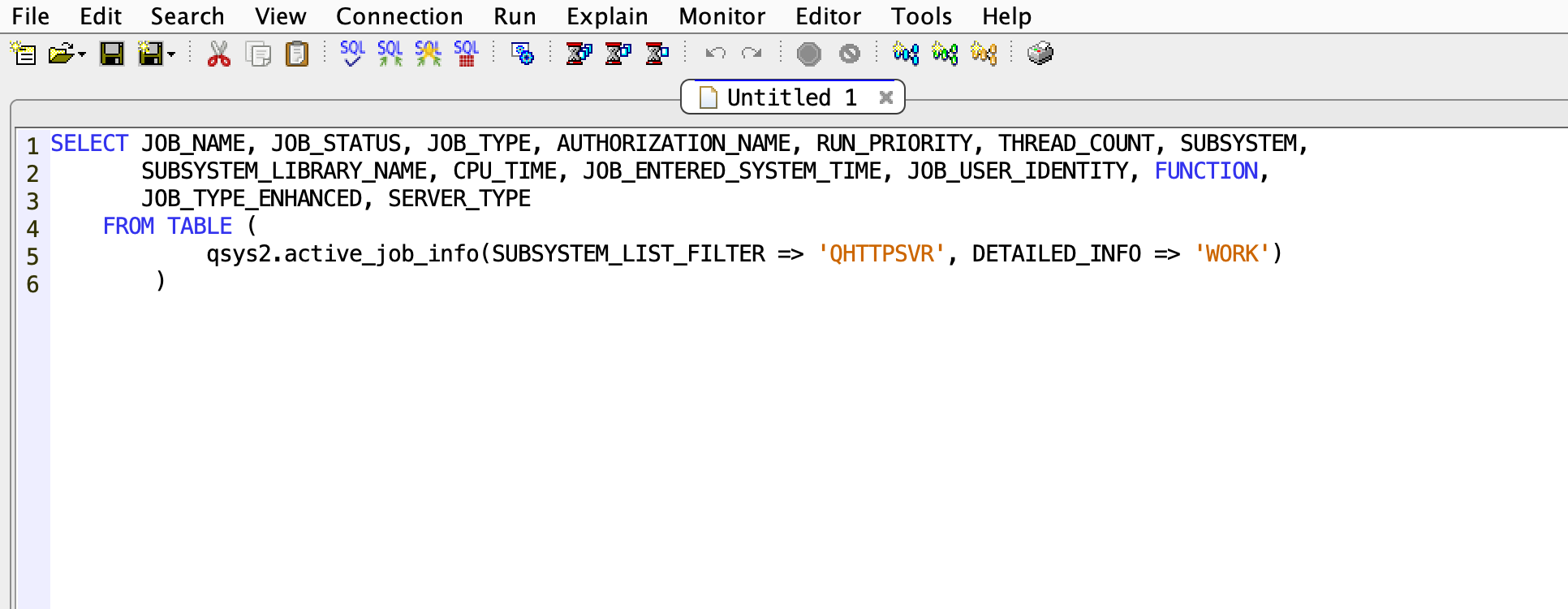
After that I needed to know if the *DEVD was locked by a job, meaning that the printer was started. For that I went to the screen shown below and pressed the “SQL” button:

Again, I made some changes, with this as a result:

Next month I will show you how to put this knowledge to good use so please stay tuned”

With these two SQL statements I have all what I need to create a SQL procedure. In my article for next month I will show you how this is all glued together. By then the customer will probably had the opportunity to test the procedure. So what I will show you has already been set to good use.


Node-RED & DB2 for i Connector

I know I said in my last article that was the end of my little project on the Raspberry Pi with Machine Learning talking to the IBM i.  Well since my last piece I have found how to correct a couple of the moans I had with Node-RED on the IBM i.

My last article can be found at https://powerwire.eu/raspberry-pi-and-machine-learning-2/ if you missed it.

As you may recall, I had intended to receive details of a photograph taken by the Raspberry Pi and then, using ActiveMQ as a delivery method, store those details on my IBM i using Node-RED and DB2 for i.

This idea failed misserably as I could not install the DB2 for i module in Node-RED. 

This article will show how I got around this issue with the DB2 for i module in Node-RED.

When I attempted to install the DB2 for i module, it failed with an error code of 127.  Nothing could be found on the web on how to resolve this problem.  Even trying the install on another Power server gave the same results.

As I was struggling with time, I used PostgreSQL to store the details, but being someone who loves a challenge, I had to find out why this failed and how to get around this problem. 

The Node-RED documentation for the db2-for-I node is very dated.  It hasn’t been touched for over two years https://flows.nodered.org/node/node-red-contrib-db2-for-i and my issue on the associated GitHub repository hasn’t had any response https://github.com/IBM/node-red-contrib-db2-for-i/issues

Looking into the coding of this node, it can be seen that it is only a front end for the node package idb-connector and this is where the problem existed.

The Node-RED flow needs the idb-connector to have any chance of working.  This has to be installed prior to the Node-RED db2 connector to work successfully.

The idb-connector repository on GitHub is very active and well supported.  It can be found at https://github.com/IBM/nodejs-idb-connector

The steps necessary to successfully use the Node-RED DB2 for i adapter are shown in the figure below.

And that resolved my problem.

Conclusion

To conclude, you must manually install the pre-req of idb-connector before you install the Node-RED package node-red-contrib-db2-for-i

You will then be able to use the Node-RED adapter to successfully access your DB2 for i database.

As the Node-RED adapter has the idb-connector listed as a dependency it should automatically be installed for you, but as both I and a fellow IBM i friend can contest this doesn’t happen.  If I get time, I’ll see if I can find out why.

All the examples I have written for this article, and previous ones, can be found on my open-source repository on GitHub, which can be found at https://github.com/formaserve/f_Learning

If you have any questions, either on this article, or anything else on the IBM i, use the comments below, or send me a message on twitter @AndyYouens

Andy Youens is an IBM i consultant/instructor at Milton Keynes, UK-based FormaServe Systems with over 40 years IBM midrange experience. 

IBM Champion

Verified by MonsterInsights